One platform for the whole practice
DORON Tech Solutions builds an integrated platform for chartered-accountant practices that run on TallyPrime. Rather than a stack of disconnected tools, it brings the practice onto one system: a Windows desktop app beside TallyPrime that turns routine book-keeping and GST returns into guided, AI-assisted steps, and the Saathi companion apps that keep the CA, their staff, business owners and the owners’ staff in sync.
How it fits together
TBB CA sits at the centre of the practice, beside TallyPrime and the GST portal, with a Saathi app for everyone else.
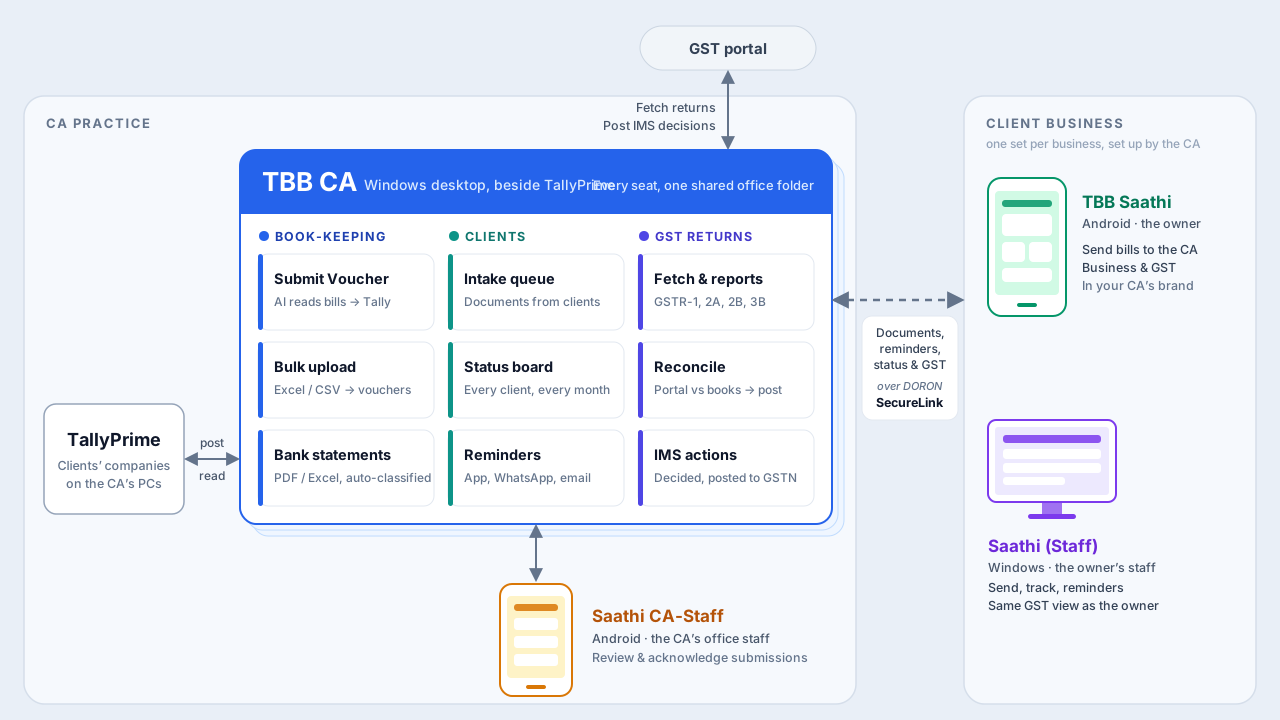
Built for everyone in the loop
🖥️ TBB CA — for your practice (Windows)
The desktop app for CA offices. It connects to your clients’ TallyPrime companies and turns routine book-keeping into a guided workflow: read invoices with AI/OCR and post vouchers, import and auto-classify bank statements, and run every client from one screen — an intake queue, a traffic-light status board, and bulk reminders. GST Returns are built in. Several seats can share one office folder.
- AI-driven data entry, even straight from GSTR-2B
- GST reports, recon and actions from your TallyPrime desk
- No limits on data entry and report downloads
- Your clients connected on the Saathi app
Add Premium Support to any annual licence: setup and activation done with you, training for you and your staff, and answers to your TBB CA queries on call.
Install page & setup →📱 Saathi — for business owners (Android)
The phone app your clients use, branded as “TBB Saathi by <your firm>”. Owners send documents to their CA and see reminders. Live business cards — sales trend, cash & bank, money owed both ways — sit beside CA cards that flag whether the books are up to date. A GST section shows each return as filed or due, the credit held up by each supplier, and supplier bills to confirm before the IMS cut-off. One owner licence covers unlimited Android installs for all the business’s partners and owners.
Install page →👥 Saathi CA-Staff — for your office staff (Android)
The phone app for your team. Office staff review and acknowledge client submissions on the go — your intake queue in their pocket, away from the desk. One comes free with each TBB CA licence.
Install page →🪟 Saathi (Staff) — for an owner’s staff (Windows)
When an owner would rather their own staff handle the day-to-day exchange than use a personal phone, this small Windows utility gives them Send to my CA, My submissions and Reminders — plus the same GST view as the owner’s phone. The same owner licence covers unlimited Windows installs for the business’s staff.
Install page & setup →🔒 DORON SecureLink
Our own secure connection service between TBB CA in your office and the Saathi apps of your clients and staff, wherever they are. Nothing to set up.
Your office network stays closed
TBB CA reaches out to SecureLink; nothing reaches in. No ports to open on your router, no fixed IP address, and your clients' Tally companies are never on the internet.
Encrypted on the way
Everything between the phone, our servers and your office PC travels over TLS, the same standard encryption your bank uses.
A key for every phone
Each Saathi pairs once by QR code and gets its own key. Only apps you have paired can send documents or see a client's figures, and you can remove any of them from TBB CA.
Transport, not storage
SecureLink carries only what the apps need: documents, figures, reminders and replies. Each message is held only while it's on its way and cleared once delivered. Your clients' books stay in their TallyPrime.
GST Returns, built in
Each client’s GST returns, from the portal to the books, in the same app that posts to Tally — no separate subscription.
- FetchGSTR-1, 2A, 2B, 3B and IMS for the whole financial year, picking up where it left off, and GSTR-4A quarter by quarter for composition dealers. The CA enters the client’s portal login and captcha.
- ReportsEvery return month by month and document by document, with a check that nothing is missing, and Excel export.
- Reconcile2B against purchases (4A for composition dealers), GSTR-1 and e-invoices against sales, and both against 3B; by document, by party or by GST rate. Matching catches different invoice-number formats, timing differences and wrong GSTINs.
- Post to TallyInvoices on the portal but missing from the books are posted as vouchers, with ledgers pre-filled from past choices.
- IMSAccept, reject or keep pending before 2B is generated, posted to GSTN and read back, with a history of every post. The owner’s own answers from Saathi show alongside.
- ITC reversalsAlongside GST Returns, TBB CA gives you a consolidated view of ITC reversals: one line per rule, showing what to reverse now, what to watch, and what you can claim back, with the GSTR-3B table each one goes in. What each client has to give back, straight from Tally and the returns: bills unpaid for 180 days from the bill-wise payables (Rule 37), suppliers who haven’t filed 3B (37A), blocked credit by ledger (17(5)), the exempt share of common credit and capital goods (Rules 42, 43), and stock on switching to composition (Rule 44, ITC-03). Checked against 3B 4(B), with re-claims flagged once a supplier is paid or files.